Monday, November 21, 2016

How to discover laptop overheating problem and fix it


Laptops are becoming thinner as the time is gone, lighter and performance is become best in now days. There for, laptops can be place into smaller and smaller casing; as a result, the problem of overheating is increase, the constant hardware malfunction or damage can be cause if your laptop overheats.


The Main Reason of Laptop Overheating

The lackness of cooling is the main reason for Laptop overheating. If your laptop covered up from dirt, which blocked ventilation, also the heat sink and CPU blocked due to thermal grease gather between them is causing this problem.


Stop Your Laptop Overheating Step by Step

Use External cooler

An External cooler is good choice for you. You can put your laptop on it; it will circulate cool air which is necessary for it. It is essential for you to know about the value of airflow in your laptop. This is the most valuable/helpful way to keep your laptop cool while you use it. You can connect it to your laptop through USB.

Get your laptop on strong and plane surface

Many laptops having small air path underneath the device. an irregular surface like pillow is make disturbance to the  proper airflow. hard surface is best for keeping laptop because of good circulation of air.


Internal cleaning


clean out any soil or dirt from your laptops by removing it casing which is the big reason for blockage in airflow. Mostly user manuals provided from many laptops manufacturers that give information your laptop inner system. If you clean it yourself and  had opened your laptop, you must clean the fans which has most important  part to keep graphics card and CPU cool.

Friday, April 1, 2016

Laptop And Desktop for Gaming Purpose actual difference between them

Fat PCs be likely to be quicker in work than small ones Mostly serious gamers knows the difference between them. More power is use by quicker chips, as result more heat
Produce, and have more transistors. Some guys think a laptop can run faster than an just as expensive desktop.

When deciding what to choose between the two so far many gamers silently struggle. It is common thinking that laptops are slower in performance than desktops but how much slow in performance can be hard to identify. Beside the price a lot of game lovers find themselves evaluate to drop in performance the portability is provided by notebook ,a knowledgeable judgment must to make for choosing between the two every one need to identify.


Speed of Processor

For better result in video game playing recent computer processors are infrequently preventive factor. Physical core engine and simulated intelligence are significant mechanics which are running by the CPU,when evaluating the 3D graphics they put the load  on hardware which is slightly enough. The performance of all running software are contributing their part in eating CPU resource. Big strategy game disappointed the gamers when they playing on slow dual-core processors.

The Laptop and desktop PC parts having quit difference in performance perhaps You notice this, Sandra Processor performance benchmark attain an comprehensive performance test  between Intel’s Core i5-4590, a mid-range quad-core processor.4770K  A faster quad-core version for  desktop can reach as high as 125 but 115 is the end point of  mobile quad core  Core i7-4800MQ.

Also dual core processor Core i3-4130 get 55 against Core i5 mobile dual cores which only get 40


Result achievement of Graphics Card


Notebooks face real challenge in handling of High end graphics chips. More power is use by them against an Intel processor also they requires heavy cooling system to continue running. Therefore gaming notebooks models needs be likely to larger and heavier than standard models.

Thursday, March 31, 2016

Trojan Horse Virus how to Clear our Computer from it

For Windows platform Viruses are everywhere and main problem.How carefully you use your computer it is not an issue.your computer can be  victem of such virus that just not remove ,always there is a chance of it.if the problem exists, Please follow the few stages so you can remove the trojan/virus from your PC.

Always Scan your computer carefully by antivirus

Am I  right? you can be safe in the first step if the antivirus could catch the virus?Well May be few causes involve behind this,You can  remove them your own way ensure this,total problems will be end and you save by it.

I want to remove  trojan horse virus but how can I do it?

Always use modern version of antivirus,permentently  bring up to date your virus signature database.
make examine options stronger, probable harmful applications.pick up  the antivirus scan option inside archives.if you indicate items for scanning wisely opt them or don’t want for checking everything put down everything out for scanning.Now do a complete system scan,a better chance is given by you to your antivirus by using this way, to identify latest viruses.


check your’s system using safe mode


removing the virus manually by you it is very important to doing this.the operating system occasionally protected the polluted files while running in the normal mode.you must restart your computer for enhancing your antivirus performance , to solve the virus problem,carefully execute a scan of your system after restart in safe mode above define points you must remember.
special virus removal tools must use for safety


 Special tools are offered by different antivirus making companies for viruses cleaning.Try Microsoft Malicious Software removal tool or Security Tool made by Kaspersk.For cleaning your computer from certain bugs these particular tools doing a good job.

Tuesday, September 10, 2013

Improve Internet on Android

This is common question about improving internet connectivity on Android. Surely Smartphone  having Android O/S is always require internet connectivity mainly applications use internet. Do you like  to subscribe monthly Internet.


But it is commonly practice regarding slow speed while we are update applications or surfing the web. Probably internet connection may be disturbed by several causes. Android Phone network selection is the big reason, weak signals is also 2nd more important reason.

But when I have use some small tips I observed about changing in inter speed. Not more considerable, but not so bad.

Always select right and good operator

Perhaps it is not so normal. You must be know enough information about service provider and its network whether it is strong or weak.


Install Internet Booster Applications


By the help of some applications like Internet Booster or Internet Speedup you can get some help for your phone not more considerable but something is better then nothing.

Always select right and strong browser

It is general perception that good browser is most important for net surfers. Because generally every browser having different styles of working. My proposal is in favor of Opera Mini, the compression technology use in this browser is very important for content compression. as a result surfing is going to fast.

Clear your phone Cache


More Cache store in your phone is also big reason for slow internet. Delete files daily bases from your phone cache.

Thursday, September 5, 2013

How to boost Internet Download Speed

It is general observation about wasting of small files due to slow internet speed, particularly  if you are free from your work. When you were playing any interesting online game  and drop the stage as result of slow internet might be you angry on this situation or get irritate while you were talking from your friend at Skype.

By pursuing some easy techniques and tips any one could be improve internet speed achieved the maximum limit allow by your ISP. We could not get more speed than an ISP reserved for user.If any software and tools claim about boosting the speed of downloading all of them absolutely scam

If you make some steps you can get faster speed as you want:

Close any software that utilize bandwidth like skype, msn,utorrunt etc. and verify any software using internet for  updating.


Check out your computer with the help of any proper antivirus and get confirm that your computer is not infected from if any spyware or malware.

If no progress in your download speed that means there is some trouble DSL service provide by your isp. If problem is exist then follow some steps for increasing speed:

You can get fast internet surfing by using external dns server tools instead of your slow  isp server for example: Simple DNS Server or Open DNS:

After attempting all these practice your internet speed will improve and went up to the high limit and if you are at rest not convince by your download speed, then adjust your service provider or raise your internet speed.


Monday, July 8, 2013

We are helpless without Computer Hardware

Computer expertise is affecting ever by adjusting the way we effort and the way we use to make work constantly being evaluation. but even as we can now utilize ‘the cloud’ to save documents and apply programs which are available at virtual domain to work on documents, we’ll constantly want a assured amount of hardware to carry out the tasks we do.

Here is some vital hardware without them we are helpless:


Keyboard

Keyboard is the main part of computer hardware it could be nearly unfeasible to live without. touch screens are suitability in using at today’s world and  more popular however for the day-to-day odd jobs which can of us have to complete, for example a simple device is imperative.

Monitor

A monitor is very main visual display device. And it confirms how main computer monitors are that the currently entire the key cell phone manufacturers are boost their screen display size slightly than making it smaller. Monitors are pretty inexpensive and are observe as a not reusable piece which infrequently goes in the wrong.

Printers

In today digital age printer is yet grasp a major importance for us. although some peoples  can not have a printer that linked openly to their computer at all there will be at any rate one printer linked to a network which be able to be utilize by a huge digit of people.

Computer network connectivity

Our computer is simply useless. lacking of connectivity to the internet or internal network. Our trust on WiFi technology mutually for desire for awareness has led us to extend network technology to a scale that it’s familiar for peoples to now about it how to have a network at house where gadgets such as printers, Smart phones and tablets can connect.

Thursday, April 18, 2013

How to Solve Laptop general problems

There are little things which make additional difficulties than practice a technical problem among your gadgets. If you are equidistant through an imperative project, the final thing you want is for your laptop to start not working. Yet, if you’re understanding issues with your laptop, it pays to consider that many people lean to occurrence several of the equivalent problems with their computers.

With this in mentality here’s a gaze at some of the mainly general laptop problems people meet and pc activities on how to solve them.

If you utilize your laptop when you are on the walk off, the probability is you plug and unplug your charger chord more than a few times daily. This important hold and slit can show the way to conflict of the chord and probable no entrance to a power source. Whereas that could be annoying, the bigger anxiety is that a spoiled chord possibly will harm the system's battery during irregular charging, and potentially cause a fire risk.


It’s significant to find this trouble explain quickly. You can purchase a fresh laptop charger as of the majority electrical freight stores. Otherwise, try systematic electrical or vessel tape over the harm for a little period solution. For a new stable fix try with a silicone sealant, which is presented at hardware stores - this will fill and guard it from harm.


Laptop jammed keys Problem

It is not rare for keys on your laptop keyboard to turn into a slight oppressive. However when an entity key turn into stuck and type an only letter continually it can truly bound your efficiency. In several cases, mainly remarkably Note Books. You know how to acquire individual substitute keys. Supplementary affordably you can purchase a substitution keyboard for your laptop.

Laptop Slowly Operating Problem

While laptops get older it is simply innate that they will begin to function a slightly slower. specially when dealing out with data. The large amount of common difficulty for a slowly working computer is having as well greatly data. Begin by clearance your hard drive to plain several gap and memory and then attempt operation the defragmenting function.

Over-Heating Problem

If your laptop is repeatedly dreadfully slow making weird or noisy or fetching terribly hot. It can be out of order and disturbed by cooling delay. Much of laptops have inner cooling fans fix on the CPU or a fan fit over the graphics Card.

If laptop parts stop working, the capability of the computer to chill down can grow to be bang. defensive upholding is the greatest method to work out laptop troubles. If you make use of your laptop for some hours in a line judge to getting a laptop calm pad among fans, which can facilitate it to avert from overheating.

Tuesday, April 16, 2013

Common computer cleaning tips

Dirt and dust in your personal workstation is sufficient source of PC problems and it creates your PC to failure and destroys expensive data. Dirt and dust can prevent air run and put off the PC fan from functioning.
This wills origin of hazardous result on your computer. clean-up your PC can boost its life. In this post I have specified some common computer cleaning tips to maintain a computer fresh.


Common computer cleaning tips

Before cleaning, switch off your computer.
Never mist the fluid straight onto your system part. Spray the fluid into elastic cloth and apply that cloth to clean your computer part.

Blur is utilized to get rid of dirt and soil roughly the computer. Avoid using vacuum to clean in desktop components. It generates fixed energy and amends the inner components.

If you want to use vacuum cleaner to clean in of your PC, then apply a moveable battery based vacuum mainly considered for this use.

Ignore to apply chemical cleanout solvents. Several people have sensitive as result to chemicals use and several chemicals can constant harm the components.

Constantly utilize water or very dilute solvent for clean-up.

While cleaning System fans even desktop computer or laptop, it’s suggested to set a little among the fan blades. It will avoid your fan from revolving. Spraying condensed air into a fan can root of damage.

    Keep away from eating and drinking close to the computer and attempt to evade smoking by the computer.


Thursday, July 12, 2012

Replacement of Ink Cartridges can harm Printer


It’s commonly admitted that print cartridges with real company are costly. There's an amount of basis for this but the core basis is that by charge extra for their cartridges, printer maker can give to charge fewer for the printer. sorry to say, this stand for to a set of clients purchase a economical printer and afterward locate OEM cartridges prohibitively costly.
                
That is why substitutionaly ink cartridges arrive in. definitely while any cartridge not prepared by the printer's manufacturer, alternate ink cartridges recommend a economical substitute to OEM cartridges. even as at hand are many sound dealers suggest this category of printing resolution, there has moreover appear a promote for weakly made remanufactured and cloned cartridges.

If you prefer to purchase a substitution of ink cartridge from a trustworthy dealer, you can be
Logically convinced that it won't temporarily spoil your printer throughout treatment. The poorer that can ensue is if you spoil the printer even as put in a intermediary cartridge, which nearly all assurance won't cover. Merely by a third-party cartridge shouldn't smash your printer.

Alternate cartridges normally act as supplementary nominal problem than ones from the inventive maker. The mainly frequent troubles arrive as of the chip put in in third-party cartridges, which is a complicated process. You will identify if the chip is defective if you can't find any prints. fewer general concern embrace pitiable class prints and outflow, even if it should be illustrious that retailers are officially clear to return any cartridge which doesn't task suitably thus although you may go down time, you won't plunge money. Nearly all recognized retailers will furthermore recommend money back promise.


The actual question is that with replacement comes with duplicate and economically remanufacture cartridges. Habitually, the people build these cartridges feel like to find the charge as low as feasible by no observe for value; the effect of this is reduced value cartridges that will make below standard prints, if they yet effort at all. Curve will certainly have been scratch in the present of these cartridges, which signify the product can be wrecked on the system to you.


Duplicate cartridges are parallel to economically remade single, excluding they are twisted for yet discounted. Among such little built-up outlay, these are habitually trade in largeness from the Far East. The charge is regularly absurd and is appealing for smooth the mainly alert of buyers. Don't be trick though; the values of these cartridges is regularly pitiable and symbolize a facade.

A Journey of Palmtop Computers


Starting from the massive analog computers toward the up to date palmtops, the computing appliance boast to come an extensive mode. While complete in sizes appreciably, the nearby day appliance are manner to the front in expressions of knowledge and functionality. Palmtops in thorough are between the top case to confirm how computer hardware has experienced amazing modify in the long-ago.

Widely identified by the name similar to PDA and pocket computer, a palmtop is considered as compact handheld device. Produce about 30 years back, these appliance have enhanced in conditions of formulate and functionality.


beginning of PDAs:

in 1992 Personal digital assistants move toward keen on through the start on of Newton by Apple. The tool attribute object-oriented storage databases and a selection of application software programs. It was pursue by Nokia 9000 chatterbox, the PDA begin in 1996 and observe like the top selling PDA till date. The apparatus and its offspring like 9110 and 9210 supply as ancestor to the current day smart phones. Palm was a different group in the later on piece of 1990s that come positive by enhanced choice of palmtop devices. Palm Pilot is individual of these goods which in the appearance of superior versions go on to trade yet today.


Modern Palmtops:

nowadays, Nokia and Blackberry begin smart phones are observe like the palmtops or PDAs. It is certainly stirring to get an awfully astonishing range of features to compose this tool massively competent. Touch screen interactive in superior type is one such quality appeal reveal. distant from effective keyboards, these devices moreover support outer keyboards that can be allied during diverse ports and technologies.


A recent palmtop computer could hold a choice of memory cards, resembling SD cards, micro SD cards and Compact Flash cards. Wireless technologies approximating Bluetooth and Wi-Fi are as well support by these apparatus that jog on the stylish operating systems like Windows Mobile and Android.

The voyage of palmtops furthers a new element to the record of computer hardware and own computing. Among regular progress in route, one can imagine to get yet enhanced devices in the by future.

Friday, April 27, 2012

Removing Adware Files from your Computer

If your PC infected from Adware don’t worry here are technique for remove it from your computer, you can both get rid of it automatic or manually, or via anti adware spyware software. For those who are not expertise confidence, you are silent capable to eliminate it the manual way, as it is not to tricky to do. The more malicious adware programs may not show up in the program list, however, you may find the less intrusive ones to emerge on your record. By means of a high class anti adware and spyware software has aid to clarify my PC of irritating pop ups and improved its speed notably.

If you uncover that is the case with your bug topic, you can eliminate it by with the uninstall utility of your device. Used for Windows users, this choice will found  in your control panel, and pick Add/Remove icon. when you are at hand, you will notice a record of objects. continue by hit it off on the unknown item and check on Remove. To make assured it is entirely impassive, restart your computer.


yet however it resonance simple and it is feasible, once in a while it can be very tricky to fully wash them out of the computer. There is no assurance in significant if the program is adware. You could facade various obscurity in result out which program is effect you the troubles with your device if you have no inspiration what it is in the rest.

You can initiate by downloading the most recent modify files for your anti-virus removal program. This will ensure it's the latest on which nature of virus to appear for plus how to identify it. Any anti-virus software has a renew button which you can hit on.

while it is updated, you must leave all programs and browser that are presently energetic. afterward, detach your computer or notebook from the Internet. when that is all completed, you may begin successively your cleaner program. The program will gaze for any apprehensive files, and when it identify any, you will collect notifications on the files that could be injurious to your device.

one time you are notify about them, it is suitable that you run a check. You will collect a warning that pose for your authorization to eliminate those dangerous programs, click okay so that every files will be distant. still, facing you ensue among this, certify the inoculation choice is curved on so that it can keep your device beginning those programs in the future.

Wednesday, April 25, 2012

How to get rid of Security Shield

Security Shield is the most recent malware risk for Internet user that has been taking a toll while the mainly wicked malware program as of it's potential of affectation as an anti-virus program and as a result forceful the user that the system being used by him/her has been polluted defectively by Trojans and malwares and so the user requests to purchase it to put away his/her system from getting any more harm.


The program acting on the mentality of the consumer influential them the program is enhanced than the one previously install on the computer of the user and consequently the user must get a trail version of the program at the most where actually the user must be paying attention on its removal.


When the person find the trail version of the program, it make a examine on the system and illustrate a listing of some viruses and malwares that are hurdle to create harms and injure on the system which really might not even exist on the system. The troubles are revealed in a few files and folders that do not still subsist on the system which indicate the just setback that the method might be having at the minute possibly will be the Security Shield simply and so user should take out it.

it must to eliminate this program occur from the verity that the program itself is a form of nasty virus that bogus running a test on the computer the jiffy it gets set up on the computer and illustrate some creepy outcome of viruses, parasites and malwares to the user computer that do not yet be on the system to encourage him of the troubles and indemnity on his computer that the program has been capable to identify and the previously accessible anti-virus program was not capable to discover and as a result the client must enhanced get rid of it immediately probable. There are simply some symbols that might facilitate the user recognize faithfully what they are selling with the jiffy they find their hands on one.

The anti-malware program is accomplished of begin a serious treatment of the system's RAM and as well illustrate several mysterious system procedure using entirely unsystematic names.

The program generate trouble through mechanism of a few genuine anti-virus or anti-malware program making it pretty unfeasible for the program to yet find undo.


This virus turn into extremely compulsory immediately potential for the plain basis that the virus has a extraordinarily risky nature to wedge all genuine anti-virus programs and thus make the operating system susceptible to several such malware infectivity that acquire in contact of the system. Security Shield Removal is mutually doable physically or by via an programmed tool. The finally recommended to get rid of Security Shield as the previous has a affinity to smash up the system very faultily if constant a small inaccuracy occurs. And thus is elective to abolish it manually only to the IT experts and no one besides must go for Security Shield removal manually.

Saturday, April 14, 2012

Information about Mini USB Cable


A tiny USB cable or lead, occasionally erroneous for a micro-USB wire, is gradually more general device utilize for shift data from one device to other. The reputation of the several USB is suitable as huge part to the outburst of stylish phones and tablet devices which apply them to join to a PC or a charger. even though several line can differ in range from 3 mm to 7 mm, the measurable mainstream of that devices operate the equal size connector. A mini USB cable got   regular as of 2007, excluding nearly all individuals believe the terms lots of USB and micro USB to be compatible even with the detail that they are not accurately the same.


One of the chief settlement to apply this kind of cable is the truth that records can be transmit from one device to a different by a pretty speedy rate. mainly several USB cables are considered used for USB 2.0 connections. as well to mobile phones operate these cables, various digital cameras and GPS navigation devices are as well measured for a this type of cable. Overall, a cable that facilitate among one device will work with other while there are extraordinary case where a device is studied to only be apply with the original cable that was supply with it or an OEM substitution.

A tiny USB cable arrive in three diverse types, there are A, B and AB. Impressively these three having diverse form factors outlying is fairly plain gratitude to the fact that they are color-coded. Adapters have a holder that is white on the within while the outside of B adapters is black. AB adapters are gray in color on the inside. When change a damaged or wrecked cable, is a fine inspiration to dual check the within of the connector to compose definite that the alternate unit is a express match.

 By the use of a little USB cable since the industry-standard for handy devices, it is probable that a someone has some just regarding their home. These lead are chosen by appliance maker as of the reality that they are capable to send out both data and power assembly it potential for a person to charge their device although transmit pictures, videos, or documents. These cables are presented an amount of different piece and a particular premium cable could be proficient to substitute a handful of cheaper piece plainly because they are competent to join to subsequently lots of different devices in a home.

Wednesday, April 11, 2012

Make Your Internet Explorer Browser Secure


If you are utilizing Internet Explorer as web browser , you can trim down the quantity of weakness to it go off during when you are online. I have enclose considered a inclusive Internet Explorer maintain point for you. It will stride you during the method little by little and educate you what how all setting facilitate sheltered your browser.


Practice yourself :

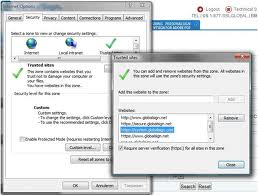
Open Internet Explorer. get on the Tools menu and choose Internet Options from drop-down roll. while in the Internet Options pane, show up the precautions check and you will see a list of internet protection zone. connect the Internet zone and pull the security zone slider to High. It will be place to intermediate with default. Afterwards, click the Custom stage tab. You motivate subsist in the protection Settings - Internet Zone dialog box. in reorganize principle settings, tick the drop-down arrow near Reset to and decide on High. It will be present locate to Medium-High (evade) by default.


as well disable certain characteristic similar to Java, ActiveX Control and plug-ins (halt all the settings linked to them), Active Scripting, and cookies and that. during which mainly of the malware infectivity glance addicted to your computer, make it protected. These are constantly unseen bogus complimentary internet base bug subtraction software, plate clocks, audio/video songs etc. You preserve decide on the stop button under all setting to halt it. subsequently, click the Reset button. while provoked, verify the accomplishment via clicking the Yes button. The setting resolve to modify  the High stage. beat the OK button to go out the dialog box. You will come back to the protection tab. also you be able to organize setting used for extra security zones to make Internet Explorer protected.


currently hit it off the Privacy tab. you will notice to the privacy settings used for the internet zone will be place to middle. These setting be used for the cookie, undersized textbook collection. Cookies be located lying on a computer via each the websites to save a client information like online actions approximating website surfing and partiality and testimonial akin to email address and password etc. as a result, you can recognize the hurt cookies mainly if they are of malevolent websites preserve do just before you and your computer. toward obstruct cookies as of individual positioned on your computer not including your permission, tick the prevail regular cookie usage. moreover, pick the choice on time in equally First-party Cookies and Third-party Cookies. This resolve avoid all the cookies from join place on your computer lacking your permission.

Click the OK button to leave the complex Privacy Settings window. You will at the moment depart to the seclusion check. Click the site switch to deal with each site separately. You can type through the address of a website to moreover hunk or affix it to your hazardous or safe zone correspondingly. Click the OK button to go again to confidentiality. compose confident the rotate on Pop-up Blocker or hunk pop-ups selection is checked. If you utilize In personal Browsing, pick the halt toolbars and addition when In personal Browsing initiate selection. moreover, pull the seclusion settings slider to the increase or maximum point to make certain highest shield against phishing and spam etc.

Saturday, April 7, 2012

How to Repair Laptop


Citizens who’s opinion are of learn laptop repair could look a complex point in decision an satisfactory training course. The basis for this is basically the need of strict exercise existing. mainly people who decrease into the ground of refurbish laptops act so because they are previously a computer technician and they get themselves fearful in the deep conclusion and having to dip by attractive on repair jobs, such as a cracked screen, and very soon in receipt of on with outline out how to go a propos the job. except what if this isn't good sufficient for you? What if you sought several correct training? What if you wish for to crack into IT renovate and didn't have the prior skill of a computer technician?

The initial choice is that you crunch into the shell and begin attractive laptops at a distance yourself. This isn't a shocking idea if you are attractive useful with a set of screwdrivers excluding there are noticeable problem. mainly people get a laptop shred behind point on the internet and copy it. over, this is OK as extensive you don't lost too extreme from the steps that you are subsequent. although what if stuff don't go according to preparation? It only acquire one mistaken tread with this 'see one do one' come up to to put down you irritated and rather openly lost.

This is possibly an amplification but it can and does take place; yet attend to the aphorism the shade important the blind? confident, the guy on the video look to recognize what he's liability but he isn't available to stop and help if you get it mistaken. It is this face that may escort you to appear for an substitute method of learn which may be to join on a course.
There is a set of reserve learning or DVD style lessons for you to prefer starting on which you are bright to observe other people enchanting laptops distant. You can in addition go during some premise but the weakness to this approach is your require of hands on familiarity; it's true that there are a strict lack of hands on courses existing - mainly here in the UK. This is a factual infamy as people lean to choose a mobile appliance such as a laptop or tablet PC to transmit out their daily computing responsibilities upon. Your common technician desires to meeting up their expertise to be bright to renovate these strategy and so act you if you wish for to remain up, behind every we are say to cloud computing is on the mode and if you have not listen to of this prior to you rapidly will do!

further One come near to find out laptop restore is to purchase a book and afterward several wrecked laptops and continue to do taking them distant. This come near once over is defective, for instance, what make you do while you want to request a issue? What do you do when you get immovable?

The finest approach is to stare about for an coach direct laptop repair course. There are a little except you want one that is exact for you. A little questions to solicit yourself are: 1) Can I fit the guidance about my recent situation? 2) Will the way go over my head, in extra terms will I recognize it? 3) How a large amount will it rate and what type of practice will I be receiving?

Apple iPad, Tablet, or Notebook?


An remarkable choice but which is accurate for you?

I enclose constantly subsist fearful with the Apple iPad, Tablets and immeasurable other versions locate out by the immense field of computer manufactures. There is awfully a lot impressive for each one, without it is essential that you the likely shopper know the disparity and prefer wisely.


Apple iPad, Tablets:

The iPad and Tablet be especially greatly in a set of their own. A big proposal for lots of, but if you want impressive that is a slight more frisky and flexible then there are prosperity of option accessible for you. The most important appeal of these is in individual squashed, brightness weight, and have a fairly long battery life. On the supplementary pass they have partial hard drive storage among a existing most of only 64 Gig. These are okay for "Surfing the Net," transfer and getting emails and singing around with a surplus of programs.


The little 64 Gig hard drive make devices of this environment ineffectual for me in my row of work. toward offer you some scheme, storage space of a 1 hour 30 min MP4 movie receive up regarding 5 Gigabytes only, even as my fundamental important programs on my desktop seize up just over 95 Gig. If your mind is set on an iPad or Tablet next make sure it has equally a USB port and a HDMI socket of a little explanation. These will arrive in neat, mainly if you preparation to acquire your device among you on your activities. The larger the hard drive the enhanced. used for me a USB port is important. Prices series from as petite as $250.00 up to $1,200.00 AUD/USD.


The Apple iPad 3 at a peek:

away from an "Over Charging" concern, I can only suggest a own evaluation earlier than decide at all procure, mainly if you are allowing for an iPad or one of the immense range of Tablets. over the new Apple iPad 3 has a restricted hard drive 64Gig and no subject USB or Video output socket. It does still come by a USB to Apple pier connector lead, and swank of battery time of up to 10 hours on a particular charge. Do not vacillate to ask inquiry, It is imperative to find the facts on the iPad 3 charge matter, and more significantly what is individual finished to address it.


Laptops:

currently these are pretty fine assessment for money, with fairly huge hard drive capability, protracted battery life, and lots of currently quicker and supplementary great than several home PC's. These are a vast choice to have if you do not aim exchange a fanatical desktop PC for your daily residence or business use. Prices series where from $600.00 to $3,400.00 USD/AUD depending on your requirements. My only worry is that various of these lean to overheat when gone on for a whilst; it is fine appeal enquiring regarding that facet sooner than manufacture any acquire.

Notebooks and Netbooks:

These are slight gems, undersized, and packed in frequently by a 10 inch screen, straight hard drives series from 120Gig to 500Gig, what situate them at a distance starting the respite is their immense power to power ratio. Apple iPads and Tablets are exceptionally lock to the equal size and load, but the supplementary plus point of between 2 to 3 USB Ports set them way in front. about all have a video output of several description, and regularly a HDMI Socket. What in actuality astonish me is momentum and control of these tiny devices. while in a faintly unusual category to the iPads and Tablets, I suppose that they are a greatly enhanced procure than their iPad, and Tablet, equivalent. Prices series starting as slight as $300.00 up to $1,500.00 USD/AUD.

Wednesday, March 28, 2012

Smart Card Reader

A smart card reader is a data input device that works and reads smart cards that allow you to store the data on the card and carry out transactions. There is also a card programmer, because it will provide a device for card acceptance (CAD), card terminals, and an interface (IFD) to write. There is only a slight difference between the terminal and the card reader.

A terminal is a standalone device that can process. A player is usually used for the unit that connects to the computer and allows it to operate or to treat, to describe their requirements.

Smart cards are moveable data cards that entail access to a different apparatus to a show device, network or computer. It is important that you place in your smart card into the card reader. occasionally they can with radio frequency (RF) to work.

The function of the chip in the card can be divided into two categories. The chip card can be used as a memory or it could be a microprocessor

It does not follow that the moment a card reader and a contact, your data is immediately opened. Each device is needed to each other to identify by sending and receiving messages. If the information is not shared matches, he takes his job and no further processing. The advantage of this chip technology on ordinary credit cards is the ability to defend against any unauthorized users because it uses very innovative security measures. Chip technology, as it is sometimes called, is the smart card technology is becoming increasingly important in the techno scene and society as a security measure whole.Apart that there are several approaches to protecting your smart card.

The smart card reader provides a path for the application to send and receive commands from the smart card. There are many types of readers available on the ISO (International Organization for Standardization) group was not able to provide a global standard for communication with multiple devices. Therefore, there is no one-size device that fits all approach to communications technology smart card. Examples of different readers are serial, PC card, and models of the standard keyboard. But even with all these decisions on most computers now come with an integrated player in the smart card.

Although there are many readers out there, we must keep in mind that properties that we should all seek, which is desirable to have a card reader. Types of contact card, as is the contact between a reader and a smart card to be physically related.

There are two types of contact and are in contact with the landing and frictional contact.

For the reader, the frictional contact includes touching her part is already solved. The contact wiping the chip and board area, if the card is inserted.

For readers movable landing type of contact is the contact piece. Only to land on the chip after the card is fully inserted. Typically provide card readers, a type of landing a better protection of the contact card uses the kind of friction.

Thursday, March 8, 2012

How to make Computer high-speed

Computer science has become very important in our lives in this world of science and technology. This is not only beneficial for computer professionals, but also home users use it for different purposes. So people should know basics of computers, to use it effectively. Students formed, and the age group should quickly learn the same computer, because they can help in many ways.

It has become so common that even children know the basics of each of the computer. You know that the physical parts or the name of the computer peripherals. It is easy to learn the names of these parts if they do not know in advance. If individuals have a prior knowledge of computer basics, so they quickly learn the computer. Although he does not have much in common in old age, but older ones are now familiar with it because they see their son to work there very comfortably.

To quickly learn the individual machines must properly plan and division conference should be conducted carefully. There are some steps you can quickly learn the computer needs. He or she has to share the learning process in different phases. All phases are described in detail below:

First day in the first phase, we need to know the basics of the computer, such as keyboard, mouse, monitor, CPU, camera, microphone, hard drives, compact disks.

In the second day, the student must know the operating systems, icons, desktop, cut, copy, paste and other basic functions, to quickly learn the computer.

On the third day, we must try to learn to use specific software such as WinZip, Microsoft Paint, Notepad, DOS, word processing, etc. required

After the first three phases, we had an idea about computer databases, so that he or she must try, some things in advance, such as bold, italic, text formatting, learn to spell check, FrontPage and HTML pages.

In the fifth phase should be as spreadsheets, tables, constants, loops, compilers, languages, and theoretical knowledge to learn to program. Know after learning the basics of computers, what you should have printer, scanner and printer cartridges, etc. They know how to feed the paper and get a feel of Microsoft Word, Microsoft Excel and other computer programs.

In the last phase, we must know how to dial-up, as you surf the Internet, the ISP's and some of the concepts of LANs and WANs.

Knowledge of all things above can help you to learn quickly and the computer has a solid foundation of computer science. Once you have learned basic computer and then with the passage of time and computer use, you will learn a great deal of knowledge. You can adjust the speed of learning computer according to their speed, since it heavily on the ability of a person to learn. You can learn the basics of computer through many resources, including Internet, CD and DVD.

Thursday, March 1, 2012

Importance Keyboards in Computer Game

Computer game has turn into a accepted habit for many people. The mainly general way is to play games on a computer. go on in the most recent only some years numerous top games to be playable lying on the network and on a laptop or home PC. This provides thus far a new element and the opportunity of online games for each. A program that must a keyboard. A gamer keyboard is a type of classic keyboard, the user, to use it to find some game titles to a own computer. These types of computer keyboards are handled exclusively premeditated for computer games and make people extra successfully hold out their events, when the games on the PC.


As with most other products, is a keyboard comes in many varieties and species. A proven method to determine which is the best PC keyboard for you to go to the most discerning gamer keyboards. In reading about these estimates, you will be able to one that is best suited to your needs are. The comments also mention the numerous attributes and benefits of each keyboard, so you all about what you can get when buying a look. User reviews of keyboards for games are the first source to check when you buy a gaming keyboard.

One of the most beautiful models are manufactured by Microsoft keyboard. The Sidewinder X6 is one that may have less capacity compared to the Logitech models, but it has some unique properties that make it an asset. A Microsoft keyboard a detachable keyboard, which makes complete access to your computer mouse. The keyboard keys are large Microsoft, so they also reduce typing errors. A gaming keyboard from Microsoft also manages a maximum of 90 combinations of macro, so you will have a significant advantage when playing on a desktop. If you have a Microsoft keyboard gamer, you also have a continuous voltage actionkey functionality of another key that you use when you touch the couple together. This speeds up the functionality and efficiency. ITunes and VLC can also be managed with the game from Microsoft. With the help of a Microsoft gaming keyboard is an excellent choice for the PC game, especially for games like World of Warcraft.

a further trendy form on the origin of immeasurable reviews, about every keyboard Logitech keyboard. Logitech is perhaps the best machine for gaming keyboards. The Logitech G19, in particular, the best model is built from Logitech. The Logitech model includes a number of useful functions and progressive, which will help you on your best in games like World of Warcraft can. A Logitech keyboard has a backlight button, which can be adapted to many different colors that you want customized. With a Logitech keyboard, you will get about 36 macros and the ability to disable the context menu.
 This helps to prevent interference when playing a computer game like Warcraft. If you are into FPS and RPG video games, gaming keyboard from Logitech is best for these particular types of games. Logitech also offers a number of USB ports that can attach additional hardware to consumers on the keyboard and the PC.

The many games key-note show that these gaming keyboards are ideal for all kinds of video game titles. Even if a particular game is best suited for keyboards based on feedback from the gaming keyboard The video game is an RPG game that is very popular and often played on a computer. To experience the best performance, you need the best keyboard.

Tuesday, February 28, 2012

Flash Memory Can Be wrong

Several users of flash memory goods like USB thumb drives, micro SD memory cards, MP3 players, and all that meet tricky scenarios among their records. Errors could take in, missing/ruined information, movies with lines or extra blemishes, failure to duplicate huge files,. These types of errors are not simultaneous and take place for a basis.
In these days world of portable user electronic gadgets value competitiveness starting huge brands and less important identified common brands with unstable degrees of superiority has caused an entry of counterfeits and bogus flash. further rigorously replication a variety product and wrapping and promotion at kind name prices, numerous devious sellers force position their flash memory at a bogus power so to they may trade for top prices. It is these forged capability flash goods that source the most problems.

on behalf of valid brand name USB products such as Kingston and Sandisk, the finest class flash memory be use and very strict testing as well as QC is average. In the exceptional box that their flash goods do not succeed, their guarantee covers substitution. still, in the second level market, here are lots of flash products that utilize low class or smooth downgraded flash memory. full-size brands acquire mainly of the top value flash, with several available for extra minor companies to buy.These feature flash are exclusive and if use to compose goods, regularly price themselves elsewhere of the market. The just way out is of way to make the most of minor class flash to stay viable. The revenue limits are by now pretty thin yet when by means of small quality flash (which yields slower read/write speeds), and used for trick artists that wish for smooth well again profit margin, they force place bogus memory capacities to justify top selling prices.

focal distributors get flash memory goods in general from China typically have the capacity to in detail test and QC their significance product. It is the job of these business veterans to suggest their products while market, as they include a plain perceptive of the false flash memory fixture. A tricky way would be to fall in 500 USB drives that have a bogus facility and wish that the importer does not analysis all  the USB drives. minor vendors could purposely procure fake memory products or if not negligently trade product that they themselves cover not confirmed to be of regular, and then later simulate unawareness while revealed. As an well-versed user, it is everyone's possess task to acquire from consistent outlets, or otherwise check their products to make certain they are of excellent worth. In this day and time by the plenty of online tutorials, here actually is no apology to wait a sufferer. Be wary of your flash memory products!